Pump.fun Sniper Bot vs Pump.fun Trading Bot for Solana Tokens Which One Is Better and Why
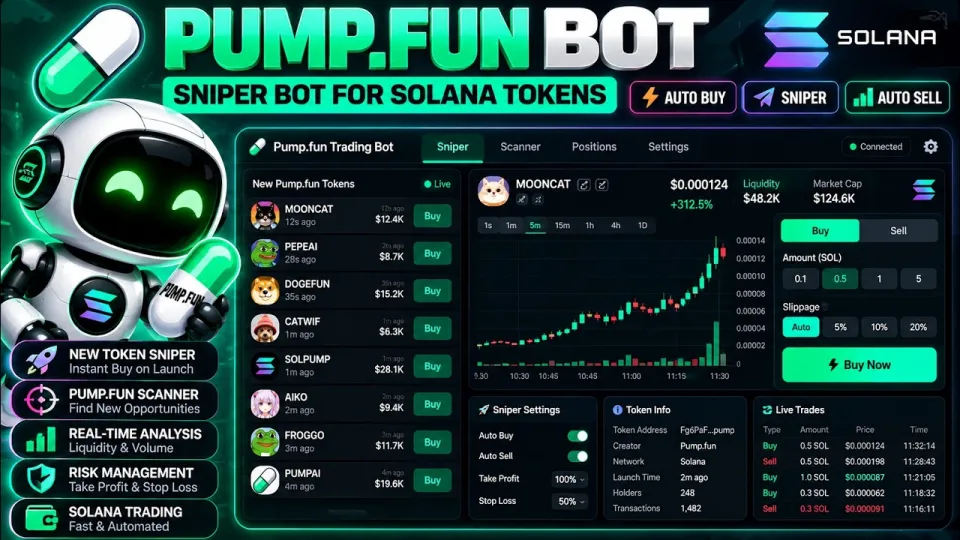
Pump.fun sniper bot and Pump.fun trading bot are two key automated tools designed for Solana token trading, each offering distinct workflows and features. The main difference lies in their focus: the sniper bot specializes in rapid entry on newly launched tokens, while the trading bot manages ongoing positions with features like Auto Buy, Auto Sell, and risk controls. Choosing between them depends on your trading strategy and need for automation in the volatile Solana token market.
Overview of Pump.fun Sniper Bot and Trading Bot
Pump.fun sniper bot is engineered for quick detection and entry into new token launches on the Solana blockchain. It uses a new token scanner and launch monitoring to identify promising tokens immediately after they hit the market. The trading bot extends beyond entry, providing comprehensive position management through Auto Buy, Auto Sell, Take Profit, Stop Loss, liquidity monitoring, and wallet tracking.
Key Features of Pump.fun Trading Bot
- New Token Scanner and Launch Monitoring – scans Solana tokens for new launches to enable timely sniper entries.
- Auto Buy and Auto Sell – automates purchase and sale orders to optimize execution speed.
- Take Profit and Stop Loss – risk management tools to lock in gains or minimize losses.
- Liquidity Monitoring – tracks changes in token liquidity to avoid trading in unstable markets.
- Position and Wallet Tracking – real-time monitoring of open positions and wallet balances.
- Trading History and P&L Monitoring – detailed records of trades and profit/loss calculations.
The trading bot operates within the DualSnipe environment, accessible via a Windows desktop app or the DualDEX web tool that supports Mac, iOS, Linux, and mobile devices, providing cross-platform flexibility.
How Pump.fun Sniper Bot Excels in Solana Token Launches
The sniper bot's strength is its speed and automation in capturing opportunities immediately after token launches. By integrating a new token scanner, it detects fresh listings and executes buy orders autonomously. This sniper workflow minimizes latency and maximizes the chance of entering at the lowest price before pumps occur. It is ideal for traders focused on short-term gains during initial token volatility.
Using Auto Buy and Auto Sell for Trading Automation
One of the standout features of Pump.fun trading bot is the capability to automate both buying and selling processes. Auto Buy triggers purchases based on predefined criteria or token launches, while Auto Sell executes exit orders using Take Profit or Stop Loss thresholds. This automation reduces manual intervention, allowing traders to capitalize on market moves efficiently and manage risk in real time.
Importance of Liquidity and Wallet Monitoring
Liquidity monitoring in Pump.fun bots alerts users to fluctuations in token liquidity pools, which is critical to avoid trading in low-liquidity environments that could cause slippage or failed orders. Wallet monitoring tracks token balances and positions across addresses, ensuring that traders have full visibility over their holdings and exposure, which is essential for informed decision-making.
Cross-Platform Access Through DualSnipe Tools
DualSnipe Labs provides both a Windows desktop download and a browser-based DualDEX web app accessible on Mac, iOS, Linux, and mobile devices. This multi-platform approach allows traders to run Pump.fun sniper and trading bots seamlessly without being restricted by operating system limitations. The integration of token discovery, automated trading, and wallet management in a single environment enhances user experience and operational efficiency.
Useful Links
- Download Pump.fun Bot for Windows desktop: https://dualsnipe.com/api/download
- Access the DualDEX web app for Mac, iOS, Linux, and mobile: https://t.me/dualdexbot
- Official DualSnipe Labs website: https://dualsnipe.com/
Conclusion
The choice between Pump.fun sniper bot and Pump.fun trading bot depends on your trading goals. The sniper bot excels at rapid entry on new Solana token launches, while the trading bot offers comprehensive position management and automation for ongoing trades. Both tools integrate seamlessly within the DualSnipe ecosystem, providing cross-platform accessibility and advanced features like liquidity monitoring and wallet tracking. For traders focused on Solana tokens, leveraging these bots can enhance speed, precision, and risk management. For the latest updates and detailed workflows, refer to the DualSnipe Labs channel and download the tools from DualSnipe Windows desktop.
Key takeaways
- Pump.fun Bot automates Solana token trading with sniper and trading features
- Includes Auto Buy, Auto Sell, Take Profit, Stop Loss, and liquidity monitoring
- Supports new token scanning and launch monitoring on Solana
- Accessible via Windows desktop and browser-based DualDEX web tool
- DualSnipe Labs develops Pump.fun tools but not officially affiliated with Pump.fun
Questions & answers
What is the main difference between Pump.fun sniper bot and Pump.fun trading bot?
The Pump.fun sniper bot focuses on rapid entry by scanning and buying new Solana token launches immediately, while the Pump.fun trading bot manages ongoing trades with features like Auto Buy, Auto Sell, Take Profit, and Stop Loss.
Can I use Pump.fun bots on different operating systems?
Yes, Pump.fun bots are accessible via a Windows desktop application and a browser-based DualDEX web app that supports Mac, iOS, Linux, Windows, tablets, and mobile devices for flexible cross-platform use.
Does Pump.fun trading bot provide risk management tools?
Yes, it includes Take Profit and Stop Loss functions to automate exiting trades at predefined profit or loss levels, helping traders manage risk effectively.
Is Pump.fun an official product of the Pump.fun platform?
No, Pump.fun bots are developed and maintained by DualSnipe Labs as an independent project, and they are not officially affiliated with or endorsed by the Pump.fun platform.
Source: Pump.fun Trading Bot | Pump.fun Sniper Bot for Solana Tokens · Markdown version